

Most "AI agent" projects fail for the same reason: the agent is clever, but nothing around it is governed. EzeCore fixes the around it.
EzeCore is EzeMind's governed platform for business-specific AI agents. It is a harness: a licensed base platform that gives every agent secure sign-in and permissions, a dedicated database with security on every record, a permanent audit trail, a document store, a task and calendar engine, a digital-forms engine, a records engine, an AI assistant and agent framework with spending budgets, and an export and reporting layer. You describe the workflow; EzeMind configures the agents on top of that harness.
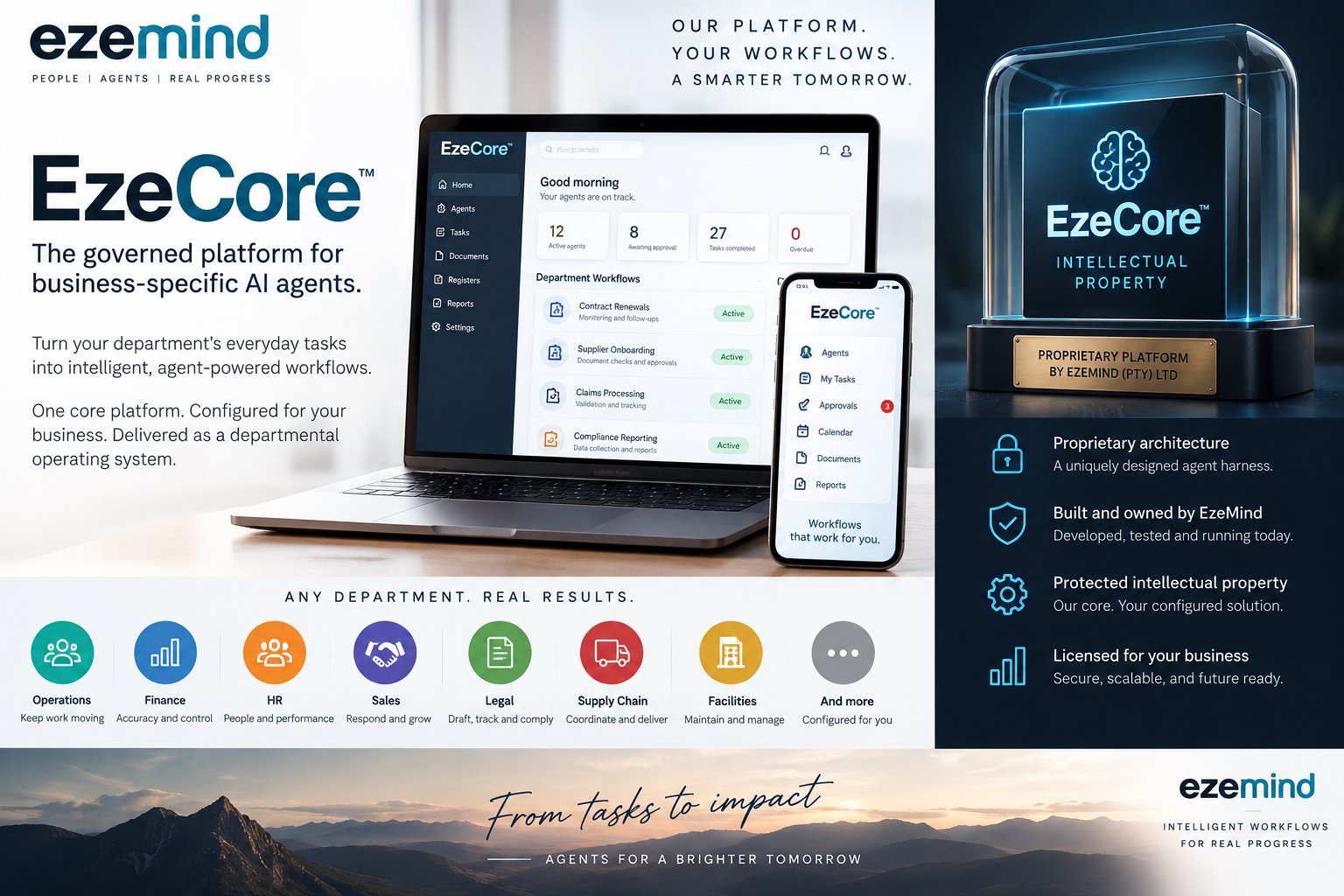
This post explains what the harness is, what each layer does, how agents run on it, and what "a live platform licence" means for a business that wants to start with one department and grow.
Why an agent needs a harness
A language model on its own can write, summarise and suggest. It cannot safely open your supplier records, decide who may see a contract, remember what it did last Tuesday, or stop itself spending R4,000 in API calls overnight. Those are platform problems, not model problems. When a business bolts an agent straight onto its email or a spreadsheet, it inherits every one of those gaps.
A harness is the fixed structure the agent works inside. It decides who the agent is acting for, what it may read and change, where its work is recorded, how a human approves it, and how much it may spend. EzeCore is that structure, built once by EzeMind and licensed to each business, so the agents you add later are configuration, not a fresh software project.
The EzeCore base platform licence: what is in the box
Every EzeCore deployment starts with the same base platform. These are the layers, in the order an agent meets them.
1. Secure sign-in and permissions
People and agents both sign in with named identities. Roles decide what each identity may see, create, approve or export, down to the department and record type. An agent configured for Finance cannot wander into HR files, and a junior rep cannot approve what a manager must sign off.
2. A dedicated database, with security enforced on every record
Each business runs on its own database. Access rules are applied at the record level inside the database, not only in the screens on top of it, so a query from an agent, a report or an integration is filtered the same way a user's screen is. Data stays in South Africa.
3. A permanent audit trail
Every action is written to an append-only log: who or which agent did what, to which record, when, and on whose approval. The log cannot be edited or trimmed by users. It is what an auditor, a regulator or your own operations manager reads when the question is "what actually happened here?"
4. A document store with secure links
Contracts, invoices, certificates, photos and reports live in a store attached to the records they belong to. Sharing happens through expiring, permission-checked links rather than email attachments, so a supplier can upload or view one document without an account and without seeing anything else.
5. Task and calendar engine
Recurring and one-off tasks, deadlines, reminders and escalations are first-class objects. Agents create tasks, watch due dates and chase follow-ups; people see one calendar of what is owed to whom and when. This is the engine behind "monitor renewals" and "chase outstanding documents".
6. Digital-forms engine
Any paper or spreadsheet form becomes a structured digital form with validation, required fields, signatures and photo capture, on desktop or mobile. Agents can pre-fill forms from records and route completed forms for approval.
7. Records engine
Registers of the things your department manages: contracts, suppliers, assets, claims, cases, employees, sites. Each register has its own fields, statuses and history, and everything else in the platform (tasks, documents, forms, agents) hangs off these records rather than floating free.
8. AI assistant and agent framework with budgets
The assistant answers questions from your own records and documents. The agent framework runs configured workflows: monitor, draft, check, propose. Every agent has a spending budget for AI usage, per day and per month, and stops when it is reached. Agents propose actions; a named person approves them before anything leaves the platform or changes a record of consequence.
9. Export and reporting layer
Dashboards for the department, scheduled reports, and clean exports to Excel, CSV or your accounting and BI tools. Compliance reporting is an agent workflow that assembles the numbers, drafts the report and queues it for sign-off.
How agents run on the harness
The working pattern is deliberately simple:
- You describe the workflow. "When a contract is 90 days from expiry, gather the documents, check the terms, draft a renewal note and remind the owner weekly until it is signed."
- EzeMind configures the agents. We map the workflow onto the harness: which register it watches, which documents it may read, which form it fills, who approves, and what budget it has.
- Agents propose, your team approves. The agent does the monitoring and the drafting. A person approves the send, the change or the payment. Approval, rejection and edits all land in the audit trail.
- You expand. The second workflow reuses the same records, permissions and reporting. Start in one department and add the next without a new system.
Typical first workflows we see: contract renewals in Operations, supplier onboarding in Supply Chain, claims processing in Finance or Insurance, compliance reporting in Legal, and leave and onboarding checklists in HR. The platform is department-agnostic; the configuration is not.
Which departments it fits
- Operations: keep work moving; renewals, inspections, incident follow-ups.
- Finance: accuracy and control; approvals, reconciliations, claims.
- HR: people and performance; onboarding, reviews, leave and certifications.
- Sales: respond and grow; quote follow-ups, pipeline hygiene, handovers.
- Legal: draft, track and comply; contract registers, deadlines, compliance packs.
- Supply Chain: coordinate and deliver; supplier onboarding, document checks, delivery tracking.
- Facilities: maintain and manage; assets, maintenance schedules, certificates.
What "live platform licence" means
EzeCore is proprietary architecture built and owned by EzeMind (Pty) Ltd. It is developed, tested and running today, not a roadmap. A business licenses the platform and receives its own configured instance: the harness above, plus the agents and registers set up for its first department. Because the core is shared and maintained by EzeMind, security fixes and platform improvements reach every licensee; because the configuration is yours, your workflows stay yours.
Licensing is per business and quoted after a discovery call, in which we usually pick the first workflow together. Delivery includes configuration, data migration where needed, and training. "Available now" means ready to implement, not instant: expect days to a few weeks from kick-off to a live department, depending on how much history you bring across.
Frequently asked questions
Is EzeCore a chatbot?
No. The assistant is one layer of nine. EzeCore is a governed platform: records, documents, tasks, forms, permissions, audit and reporting, with agents that work inside those rules.
Can an agent act without a person approving?
Only for actions you have explicitly set as auto-approved, such as sending a reminder. Anything that changes a record of consequence, spends money or leaves the platform is proposed and waits for a named approver by default.
Where is our data stored?
On South African infrastructure, in a database dedicated to your business, with record-level security and encryption at rest. POPIA is designed in: consent, access control, audit trail and data residency.
How do you stop AI costs running away?
Every agent has daily and monthly AI budgets set in the platform. When a budget is reached the agent pauses and the owner is notified. Usage is reported per agent and per department.
Can we use it on mobile?
Yes. Approvals, tasks, forms and documents work on phones and tablets as well as desktop, which matters for site inspections, deliveries and care or field work.
How do we start?
Book a discovery call. We identify one workflow, confirm the records and documents it touches, and quote the licence and configuration. See EzeCore on the Platforms & Apps page or contact EzeMind AI.