


Your software shouldn't care if Eskom does.
Loadshedding hit Stage 6 again this year. The fibre dropped on a Tuesday afternoon, the UPS at the office ran out at 16:42, and the CRM you spent R200k on stopped accepting customer enquiries until the lights came back at 19:30. Three new leads emailed, one of them twice. None of them got a reply.
This isn't a hypothetical. It's the default behaviour of almost every SaaS tool sold into the SA market — because they were built for places where the power doesn't go out. South African businesses don't have that luxury. So we build software differently.
This piece is the playbook: four patterns we use at EzeMind AI to ship business tools that keep working when the grid doesn't. They're not theoretical — every one of them is in production right now across Klar, AVA Healthcare, and the custom builds we do for SA SMEs.
Why "normal" software breaks during loadshedding
Three failure modes account for ~95% of the outages we see when business software meets the grid:
- The connection drops mid-action. User clicks "Save" right as the fibre cuts → request times out → screen hangs → user gives up. Whatever they were doing is gone.
- The whole UI is a thin shell pointing at a remote API. No internet means no app. You can't view what you saved yesterday, can't check today's schedule, can't look up a customer's number. The tool just stops.
- Critical comms route through a single channel. The email server is on the same office network as everything else, or the SMS provider's API needs an outbound HTTPS call to reach — so when the network's down, customers don't hear from you and you don't hear from them.
Each of these has a well-understood fix. Together they make software that genuinely doesn't care whether you're on grid power or running on a small inverter with bad signal.
Pattern 1 — Local-first storage
The default architecture for a web app in 2026 is still thin client → remote API → remote database. Press a button, request goes to the server, server stores it, server replies, UI updates. No internet, no app.
Local-first inverts that. Every action writes to a local store on the device first (IndexedDB on web, SQLite on mobile, plain JSON in the worst case). The UI updates immediately from that local store. Then — separately, in the background — the change is pushed up to the server when a connection is available.
The user experience:
- The app loads instantly even if the network is dead, because everything is already on the device.
- Saving is instant — no spinner, no "saving..." state — because we're writing to local storage, which is microseconds, not seconds.
- If the connection drops mid-action, nothing is lost. The local write succeeded; the sync will retry.
- When the connection comes back, sync happens silently. The user doesn't see it unless we choose to surface it.
This pattern is how Klar keeps working when a finance manager opens it on a tablet in the boardroom with no WiFi. The full month's plan loaded from the last sync; all proof uploads queue locally and push when the connection's back. From the user's view, nothing is broken.
Pattern 2 — Queue-and-sync
Local-first only gets you so far. The other half is what happens to the writes that DIDN'T reach the server yet.
Naive software treats failed requests as errors. "Failed to save — please try again." Try again? The connection is still down. The user copies their work, screenshots it, emails it to themselves, swears.
The right answer is a persistent outbox. Every write the user performs is appended to a local queue with a unique ID and a timestamp. A background worker drains that queue, posting each item to the server with retry-with-backoff. If a request fails, the item stays in the queue. If it succeeds, the item gets marked complete.
What this means in practice:
- Workers fill in their timesheet during a 4-hour Stage 6 slot. 47 entries queue. When the power comes back at 20:00 and the office wifi reconnects, every entry posts in under 3 seconds. Nobody knew there was a problem.
- A care nurse logs medication on AVA Healthcare on a tablet that hasn't been online for 6 hours. All 80 medication events queue. When the tablet hits a WiFi access point, they all sync, in order, with their original timestamps preserved.
- A delivery driver marks 12 stops complete on a phone in an area with patchy LTE. The app shows everything as "delivered" instantly. The sync catches up later — the driver doesn't need to think about it.
The technical bit: each queued write needs to be idempotent. If retry attempts produce duplicate records, we've made things worse. So every write carries a client-generated UUID — the server uses it as the dedupe key. Worker drains, retries, dedupes, marks complete. Done.
Pattern 3 — WhatsApp as the always-on fallback

Here's a quirk of the SA infrastructure stack: fibre and cellular are different physical networks with different failure modes. When loadshedding kills the cell tower's backup power, the cellular network is down too. But that's stage-5+ scenarios. For most stage 2-4 outages, fibre is down (no router power) while cellular is still working (towers have longer backup runtime than home routers).
That asymmetry is why WhatsApp Business API is the single most resilient customer-comms channel we have access to in SA. If your customer can see one bar of signal on their phone, they can message you. If your business can route through any cell network, you can reply.
We design every customer-facing tool with WhatsApp as a parallel input path, not a marketing channel:
- Booking confirmations go out via WhatsApp first, email second. If your fibre's down when a customer books, the WhatsApp message still sends from the cloud — you both get notified.
- Payment reminders in EzeFlow route to WhatsApp when the customer prefers it. Open rate jumps from ~22% (email) to ~95% (WhatsApp), and the channel survives outages.
- Care-home family updates in AVA go to WhatsApp because the daughter checking on her dad's wellbeing isn't going to log into a portal — but she'll read a WhatsApp at any hour.
The implementation cost is real (WhatsApp Business API requires a Meta-approved provider, template-message approvals, and proper opt-in handling) but the resilience payoff is huge. Every custom build we ship has WhatsApp wired as either the primary or fallback channel for anything time-sensitive.
Pattern 4 — Power-aware UX
The first three patterns make the app work during an outage. This pattern is about telling the user it's working.
Most web apps have a single network state: connected, or completely broken. We design for four:
- Online + synced — everything's normal, no indicator needed.
- Online + syncing — sync queue draining, show a subtle pulse so the user knows there's activity, no blocking.
- Offline + queued — banner: "Working offline — your changes are saved locally and will sync when you're back online." Quiet, not panicked.
- Offline + critical action attempted — for actions that genuinely need the server (e.g. processing a card payment), show a clear "Try this once you're back online" message with the queued payload visible so the user knows nothing's lost.
The difference between an app that tolerates loadshedding and an app that handles it is usually this layer. Users panic when state is unclear. Show them clearly that their data is safe and the sync will resume, and they stop noticing the outage.
What this looks like in practice
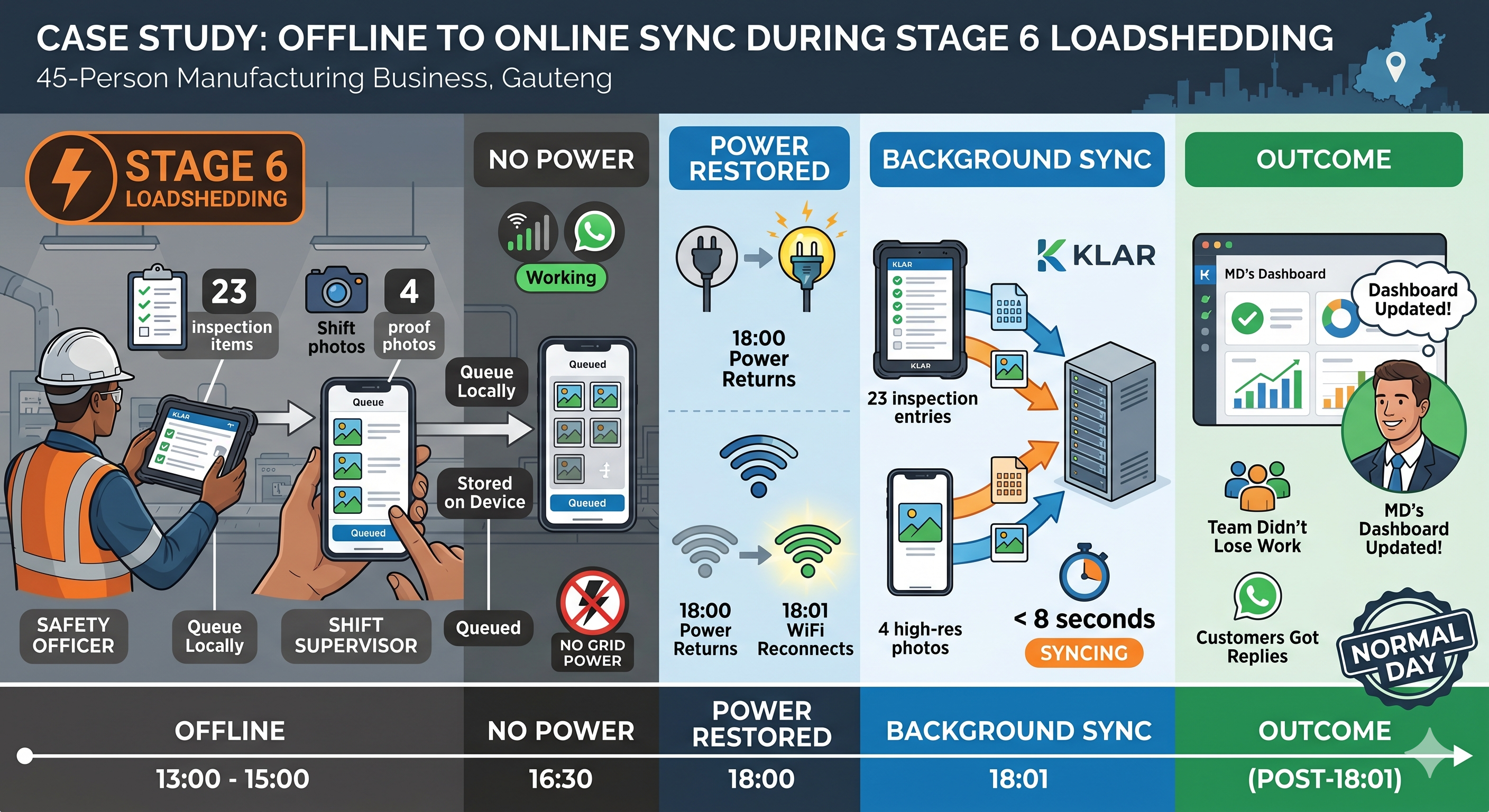
A 45-person manufacturing business in Gauteng — uses Klar for monthly safety inspections and shift-handover logs. Last quarter, during a Stage 6 day:
- Safety officer logs 23 inspection items on the factory-floor tablet. The tablet's been offline for 5 hours. All 23 entries queue locally.
- Shift supervisor uploads 4 proof photos for the daily-close checklist. Photos queue locally with thumbnails visible.
- Sales receives a WhatsApp inquiry. Auto-acknowledgement goes out via WhatsApp Business API (still working because cellular is up).
- Power returns at 18:00. WiFi reconnects at 18:01. All 23 inspection entries and 4 photos post in under 8 seconds. The MD's dashboard updates with the day's status — same as if everything had worked normally.
The MD didn't get an SMS about "system down." The team didn't lose work. Customers got replies. The day looked normal in retrospect — because the software was designed to make it so.
Why we build this way
SA businesses spend roughly the same on software as their European or US counterparts but operate on materially worse infrastructure. The mismatch is why so many tools fail mid-deployment here — they assume a baseline (always-on power, always-on fibre) that doesn't apply.
The four patterns above add some development time up front (queue infrastructure, sync conflict resolution, WhatsApp integration). But the operational payoff is enormous — businesses that run on this kind of software stop noticing loadshedding as a software problem. It becomes a building-services problem instead, which is what it actually is.
At EzeMind AI, this is baked into every custom build, not an optional extra. Klar, AVA Healthcare, and EzeFlow all ship with local-first storage + queue-and-sync + WhatsApp fallback as defaults. Our custom-software projects inherit the same patterns from day one.